
Fold Inbox.
A place for every
conversation.
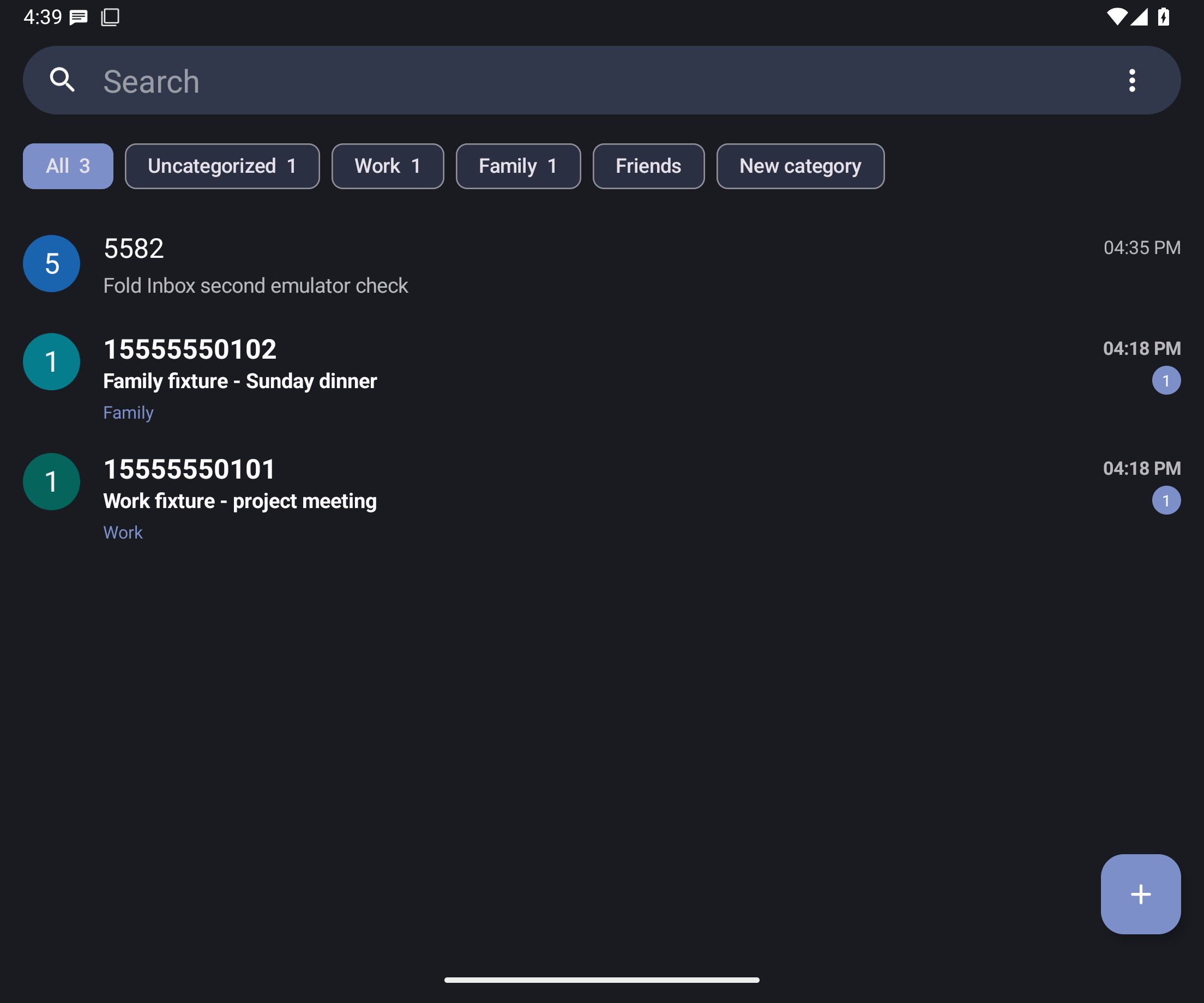
Keep work, family and friends in their own groups. An independent Android messaging app with custom categories, bulk filing and a familiar inbox, built from the open-source Fossify Messages app.
For testing. Carrier SMS delivery and photo/group MMS still need testing on a physical phone and SIM. Keep your current messaging app available before relying on this preview. RCS and iPhone support are not included.
Startup fix in 0.1.1. A blocked or canceled default-SMS request now returns to setup with retry and Android Settings buttons. Install over 0.1.0 Preview to keep your categories; do not uninstall first.
- PLATFORM
- Android 8+ · phones and foldables
- RELEASE
- 0.1.1-preview · November 16, 2026
- DOWNLOAD
- 33.3 MB APK · 6.6 MB source
- BUILD
- Development-signed · debuggable
Your groups. Your order.
Start with Work, Family and Friends, then create your own categories. Long-press conversations to file several at once. All and Uncategorized help you find what is left to sort.
Each conversation belongs to one category. Renaming or deleting a category never deletes its messages. Search still covers every conversation.
BEFORE YOU INSTALL
Make room for your inbox.
Install the preview alongside your old app.
Download the APK on your Android phone and open it from Downloads. Allow installation from your browser if Android asks. This is a separate app called Fold Inbox Preview; keep the old Fold Inbox installed.
Prepare before switching messaging apps.
Turn off RCS chats in your previous app. When you are ready to test, tap Set default SMS app and approve Android’s chooser. It reads existing carrier SMS/MMS from Android’s message store; it does not import RCS-only history or the old app’s categories.
If Android denies access before the chooser.
Tap Open app info, then ⋮ → Allow restricted settings, if available and you want Fold Inbox to handle your texts. Return and retry. Choose default apps also opens Android’s SMS-app settings. This is a per-app setting that you approve; the app cannot change it for you. Android’s restricted-settings instructions.
Test with your phone and carrier.
Check incoming and outgoing texts, long messages, photos, group MMS and notifications before using it daily. If needed, switch the default SMS app back in Android Settings.
File your conversations.
Long-press a conversation, select others if you like, then tap the folder icon to move them to a category. Use More options → Manage categories to create, rename or delete groups.
ABOUT THIS RELEASE
Know your preview.
Private categories, carrier messages
Categories stay in this app’s private storage. No account, analytics, ads or cloud sync are included. Ordinary SMS/MMS travel through your carrier and are not end-to-end encrypted. System backups, keyboards and other apps with SMS permission are outside Fold Inbox’s control.
What has been checked
Category behavior, restart persistence, phone and wide-screen layouts, and simulated incoming SMS passed emulator checks. Real outbound delivery, MMS, dual-SIM routing and physical Fold 8 behavior remain unverified. This development build is for evaluation.
Keep your categories in mind
Categories have no export or automatic backup yet. Uninstalling the preview removes its categories and local preferences. Message export is available separately in Settings.
Open source, with credit
Built from Fossify Messages and Fossify Commons, under GPL-3.0. This is an independent fork, not an official Fossify release. The source download includes our modifications and the vendored library. RCS, iMessage and an iPhone app are not implemented.
APK checksum
Fold-Inbox-0.1.1-preview.apk
057ed208f9b0a6d13595f38e17e343aa8cd2036943d44a227b09b23a8775088d